
What’s New
Software Release
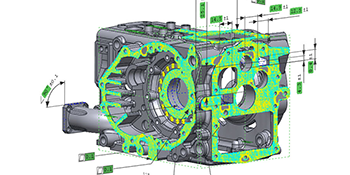
This new version brings a strong combination of enhanced automation capabilities, connection with more devices, support for additional inspection workflows such as boundary inspection, scan data processing improvements, usability improvements, and important stability updates across core workflows, reinforcing Control X as a reliable and scalable platform for inspection and metrology operations.
Discover What’s New for Geomagic Control X 2026.1
Key Highlights
Scanner Direct Control
- New Hexagon handheld 3D scanner plugin
- New ZG HyperProbe plugin
- DefinSight plugin for Scantech devices
- Grayscale Line Scanning using upgraded RDS 6.6 version
Text and Visual Scripting
- New scripting actions to support more commands
- Updated scripting actions to support more options
- Interactive selection during script execution
- Use custom selections for fully automated workflows
- Expanded documentation for text scripting with more sample scripts
Boundary Inspection
Inspection workflows using boundary features (circles, slots, rectangles)
3D Compare enhancements
Consistent measurement data and update for all scenarios
Split Mesh enhancements
- Enhanced Split Mesh workflow
- Multiple Split tools
- 3D Curve Splitting options
- Improved support for complex profiles
Decimate Mesh enhancements
- 2x-4x performance improvement
- Robust, adaptive, high-quality results
File Import/Export
- DMO export from automation tools
- Import files and PMI from latest native CAD versions
- Import Leica Geosystems files
Selection
- Reusable selection set from poly-vertices and poly-faces
See how Control X 2026.1 empowers your inspection and metrology operations with greater speed, accuracy, and reliability.
For more information on Geomagic Control X or Design X Contact Wysiwyg 3D.